
How to collect rent on M-Pesa without manual reconciliation
A step-by-step guide for Kenyan landlords and agencies: set up a Paybill, design account numbers tenants get right, and let payments match to units automatically so you stop checking statements by hand.
If you collect rent on M-Pesa, you know how month-end goes. SMS alerts pile up. Some say "House 4", some say "Mama Wanjiku", some say nothing. You open the M-Pesa statement, a notebook and a spreadsheet, and spend hours working out who paid what.
This guide shows how to collect rent on M-Pesa in a way that sorts itself out. Most of the work is in two places: how you set up your Paybill, and how you design the account numbers tenants type in. Get those right and software can match most payments for you.
Why manual reconciliation goes wrong
Reconciliation means checking that money received matches money owed, tenant by tenant. Done by hand, it fails for a few common reasons:
- Tenants pay to a personal number with Send Money, so there is no reference at all.
- Tenants type the account number in different ways each month.
- A relative or employer pays from a phone number you do not know.
- One tenant pays in two or three parts.
- Two units have similar names, so payments land on the wrong one.
Each of these turns into a phone call, a WhatsApp message or a wrong arrears figure. The fix is to remove the guessing.
Step 1: Use a Paybill, not a personal number or a Till
There are three common ways tenants pay rent on M-Pesa:
| Method | Account number field? | Good for rent? |
|---|---|---|
| Send Money to a personal line | No | Poor - no reference, mixes with personal money |
| Till number (Buy Goods) | No | Weak - you still have to guess who paid |
| Paybill | Yes | Best - tenant types a reference you choose |
A Paybill is a business number where the payer enters two things: the business number and an account number. That account number is what makes automatic matching possible.
You can get a Paybill directly from Safaricom, or use one linked to your bank account, where the bank gives you its Paybill and you use an account format it allows. Ask Safaricom or your bank what documents they need and what charges apply, as these can change.
Tips:
- Use one Paybill per business, not per building. Account numbers do the sorting.
- Keep rent money separate from your personal M-Pesa. It makes records cleaner and disputes easier.
- If you are an agency, decide early whether money goes into your account or each landlord's account. This affects how you report to landlords.
Step 2: Design account numbers tenants get right
This is the step most landlords skip, and it causes most of the mess. A good account number is:
- Unique - no two units or tenants share it.
- Short - easy to type on a phone.
- Stable - the tenant uses the same one every month.
- Clear - no characters that look alike.
Pick a simple pattern
A common pattern is a short property code plus the unit. For example:
GV12- Green View, unit 12GVB4- Green View, Block B, unit 4MK07- Mkubwa Court, unit 7
Stick to letters and numbers only. Avoid spaces, hyphens and slashes, because tenants will leave them out or add them in different places.
Avoid look-alike characters
People confuse these all the time:
O(letter) and0(zero)I(letter),l(small L) and1(one)Sand5,Band8
If you can, leave the letters O and I out of your codes completely. Use leading zeros the same way every time (always 07, never sometimes 7).
Unit-based or tenant-based?
You have two options:
- Unit-based (
GV12): easy to remember and print on the door or lease. When a tenant leaves, the next tenant uses the same number, so your system must link the unit to whoever's lease is active. - Tenant-based (a unique code per tenant): history never mixes between old and new tenants, but codes are harder to remember.
For most landlords, unit-based works best, as long as your records show who was renting the unit on each date. Good property software handles this for you.
Tell tenants clearly and often
- Put the Paybill and account number in the lease.
- Print it on the rent invoice or reminder SMS each month.
- Put a small sticker inside each unit.
- Say plainly: "Do not use Send Money. Payments without the correct account number may not show on your account."
Step 3: Turn on automatic matching
Once payments come in through a Paybill with a clean account number, a system can match them without you.
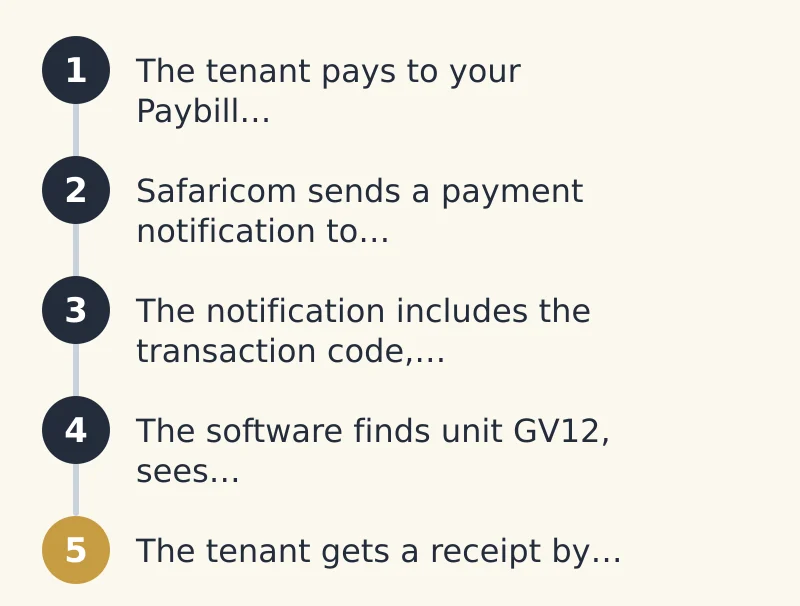
Here is how it works:
- The tenant pays to your Paybill and types
GV12. - Safaricom sends a payment notification to your property software. This is done through Safaricom's developer service, known as Daraja (an API, which is a way for two systems to talk to each other automatically).
- The notification includes the transaction code, amount, phone number, time and account number.
- The software finds unit
GV12, sees who the current tenant is, and records the payment against what they owe. - The tenant gets a receipt by SMS. Your arrears report updates on its own.
No statement download. No spreadsheet. No guessing.
How payments get applied
Set clear rules so the system treats everyone the same:
- Oldest debt first. A payment clears old arrears before the current month. This keeps arrears figures honest.
- Partial payments. If rent is KES 8,500 and the tenant pays KES 5,000, the balance of KES 3,500 stays as arrears. (For context, KES 8,500 was the median bedsitter rent on ISHI Homes as of 25 Oct 2026.)
- Overpayments. Extra money is kept as a credit and used against next month.
- Other charges. Decide whether water, service charge or penalties are paid before or after rent, and write it in the lease.
- No double counting. Every M-Pesa transaction code is unique, so the system should reject the same code twice.
Step 4: Handle the payments that do not match
Even with a good setup, a few payments will come in with a wrong or missing account number. Do not let them disappear.
A good system will:
- Try the phone number. If
GV21does not exist but the phone number belongs to the tenant inGV12, it suggests that match. - Spot near-misses.
GVl2orGV 12is almost certainlyGV12. The system can flag it for a quick yes or no. - Put the rest in an "unmatched" list. You see each one with the amount, phone and time, and assign it in one tap.
- Learn. Once you confirm that a phone number belongs to a tenant (for example a parent who pays), future payments from it can match automatically.
Your job shrinks from checking every payment to checking a short list of exceptions, often just a handful a month.
Step 5: Do a quick check, not a full reconciliation
Automation does not mean you never look. It means you look less. Once a week or at month-end:
- Compare the total received in your software with the total on your M-Pesa or bank statement for the same dates.
- Clear the unmatched list.
- Review tenants with arrears and send reminders.
If the totals agree and the unmatched list is empty, you are done. That is a few minutes, not a whole weekend.
A simple setup checklist
- One Paybill for rent, separate from personal money
- A short, unique account number for every unit
- No spaces, symbols or look-alike letters in codes
- Paybill and account number in the lease, invoices and reminders
- Software connected to receive payment notifications automatically
- Written rules for partial payments, overpayments and other charges
- A weekly look at totals and unmatched payments
A note on tenant data
M-Pesa notifications include tenants' names and phone numbers. That is personal information. Only share it with people who need it, keep it in a secure system, and tell tenants how you use it. Ask your adviser what Kenya's data protection rules require of your business.
See ISHI in action
ISHI is property management software built for Kenyan landlords and agencies. It connects to your M-Pesa Paybill, matches rent to the right unit automatically, sends receipts, and keeps arrears up to date, so you only deal with the few payments that need a human.
Want to see it with your own properties? Book a free demo at www.ishi.digital/contact, call 0116888777, or email hello@ishi.digital.
Questions people ask
What is the best way to collect rent on M-Pesa?
Use a Paybill with a unique account number for each unit or tenant. The account number tells you exactly who paid, and software can match it to the right tenant automatically.
Can I use a Till number for rent?
You can, but a Till (Buy Goods) has no account number field, so you still have to guess who paid. A Paybill is better for rent because tenants enter a reference you choose.
What should I use as the tenant's account number?
Use a short code made of a property code and unit number, such as GV12. Use letters and numbers only and avoid look-alike characters like O and 0.
What happens if a tenant enters the wrong account number?
Good software tries to match by phone number or spot near-misses, then puts anything left in an unmatched list. You assign those payments to the right tenant in a few taps.
How do I handle partial rent payments on M-Pesa?
Record the amount paid against what the tenant owes and keep the balance as arrears. Set a clear rule, such as clearing the oldest debt first, and put it in the lease.
Do I need a bank to get a Paybill?
No. You can apply for a Paybill from Safaricom, or use a bank's Paybill linked to your bank account. Ask Safaricom or your bank about the current requirements and charges.
Keep reading
Rent reminder messages that get paid: SMS and WhatsApp templates
Copy-and-paste rent reminder templates in English and Kiswahili for SMS and WhatsApp, from a friendly early nudge to a final arrears notice, plus a simple sending schedule.
25 October 2026 · 7 min read
How to reduce rent arrears: a 30-day process that works
A simple 30-day plan for Kenyan landlords and agencies to reduce rent arrears, with a reminder schedule, clear escalation steps and ready-to-use SMS and call scripts.
25 October 2026 · 8 min read
Tenant not paying rent in Kenya: a lawful step-by-step process
A plain guide for Kenyan landlords and agencies on handling rent arrears the legal way: records, talking, payment plans, demand letters, notices, tribunals and courts, without self-help eviction.
25 October 2026 · 7 min read